Hiring new employees is an exciting step for any growing business. However, when multiple employees join on the same day, arranging laptops, preparing systems and ensuring everything is ready can become a challenge.
For HR teams, IT administrators and business owners, laptop rental for employee onboarding can be a practical way to arrange the required devices without making a large upfront hardware investment.
Whether your company is onboarding 10 employees, expanding a BPO team or starting a new project, bulk laptop rental can help you plan your IT requirements around your workforce.
In this guide, we explain how companies can arrange laptops for new employees, what to check before renting and how to make the onboarding process more efficient.
Why Is Laptop Availability Important During Employee Onboarding?
Employee onboarding involves more than completing documentation and introducing new team members to company policies. Employees also need the right tools to perform their assigned responsib
When laptops are unavailable on joining day, businesses may experience:
- Delays in employee training and induction.
- Difficulty assigning work to new team members.
- Additional pressure on existing IT teams.
- Temporary sharing of devices between employees.
- Delays in launching new departments or projects.
For example, imagine a company hiring 25 employees for a new customer support process. If only 10 laptops are available, the remaining employees may have to wait before they can begin their assigned tasks.
Planning laptop requirements in advance helps HR, IT and procurement teams coordinate more effectively.
What Is Laptop Rental for Employee Onboarding?
Laptop rental for employee onboarding allows businesses to arrange laptops for newly hired employees for an agreed rental period instead of purchasing every device outright.
Companies can discuss their required laptop configuration, quantity, location and rental duration with a corporate laptop rental provider.
This approach can be particularly useful for businesses experiencing:
- Rapid recruitment and workforce expansion.
- Project-based hiring.
- Seasonal staffing requirements.
- New branch or office openings.
- BPO and customer support team expansion.
- Temporary training and induction programmes.
The rental period should be selected according to the company’s actual requirements and the provider’s available terms.
5 Benefits of Renting Laptops for New Employees
1. Reduce the Initial Hardware Investment
Purchasing laptops for a large group of new employees can require a substantial upfront budget.
With corporate laptop rental, eligible businesses can explore a rental-based arrangement instead of purchasing all required devices immediately. This can help them plan their IT expenditure around hiring and project requirements.
The overall cost depends on the laptop configuration, rental duration, security deposit, applicable taxes and other contractual terms.
2. Arrange Devices for Bulk Hiring
Companies frequently recruit employees in batches, particularly in BPOs, recruitment firms, IT companies and customer service operations.
Bulk laptop deployment for companies requires coordination between HR, procurement and IT teams.
A corporate rental provider can help businesses discuss their quantity and configuration requirements before the planned joining date.
For smoother coordination, share the number of employees joining, preferred laptop specifications, delivery location and expected rental period as early as possible.
3. Support Short-Term Projects
Not every hiring requirement is permanent. A company may recruit a temporary team for a six-month project, an implementation assignment or a seasonal business campaign.
Buying laptops exclusively for a short-term requirement may not suit every company’s budget or asset planning strategy.
Laptop rentals provide an alternative worth evaluating when the business needs devices for a defined period.
4. Simplify Device Planning for Growing Teams
A company may initially need 10 laptops and later require 30 or 50 as recruitment continues.
Planning device requirements in batches can help businesses coordinate onboarding schedules and avoid last-minute procurement pressure.
Discuss future quantities with your rental provider early. Actual availability, configuration and delivery timelines should always be confirmed before finalising the joining schedule.
5. Coordinate Technical Preparation Before Joining Day
Laptop availability is only one part of employee IT onboarding. The devices should also meet the company’s technical and security requirements.
Before deployment, businesses should confirm:
- Required operating system and laptop configuration.
- Necessary business applications and software licences.
- Security policies and antivirus requirements.
- User account setup and access permissions.
- Wi-Fi, VPN and other connectivity requirements.
- Device handover and asset-record procedures.
For organisations using managed Windows environments, Microsoft’s official Windows Autopilot documentation explains how compatible devices can be configured and prepared for organisational use.
Confirm which preparation tasks are handled by your internal IT team and which, if any, are included in your rental arrangement.
How to Arrange Bulk Laptops for Employee Onboarding
A structured process helps companies communicate their requirements clearly and plan device deployment.
Step 1: Estimate the Number of Laptops Required
Start by preparing a list of employees joining during the next few weeks.
Include the joining date, department, work location and number of devices required. If multiple teams are joining on different dates, organise the requirements by batch.
For example:
- HR and administration: 5 laptops.
- Customer support: 20 laptops.
- IT and operations: 10 laptops.
This example represents a hypothetical requirement of 35 laptops. Your actual quantity will depend on your recruitment plan.
Step 2: Finalise the Laptop Configuration
Different departments may have different computing requirements.
For routine office applications, browser-based work and business communication, a standard business laptop may be sufficient. Software development, data analysis and specialised applications may require higher specifications.
Discuss the processor, RAM, storage, operating system and application requirements with your IT team before requesting a quotation.
Step 3: Confirm the Rental Period and Budget
Determine whether the laptops are needed for a short-term project, a fixed-duration assignment or an ongoing requirement.
When comparing providers, request a clear quotation covering:
- Monthly rental per laptop.
- Minimum rental duration and lock-in terms, if applicable.
- Refundable security deposit.
- GST and other applicable charges.
- Delivery and pickup arrangements.
- Technical support and replacement terms.
- Damage, loss and termination conditions.
Compare the complete contractual cost rather than selecting a provider on monthly rental alone.
Step 4: Prepare Company Documentation
Corporate laptop rental providers may request business documents to verify the organisation before supplying equipment.
Depending on the business structure and provider policy, these may include company registration documents, GST details, authorised signatory identification and office address proof.
Ask the provider for its current document checklist before placing the order.
Step 5: Coordinate Delivery and Employee Handover
Share the delivery address, contact person, required quantity and preferred delivery date with the provider.
Allow enough time for equipment verification and internal setup before employees join.
After delivery, maintain an asset register containing the device identification details, assigned employee, handover date and return status. Your IT team should also confirm that the required security controls and software are in place.
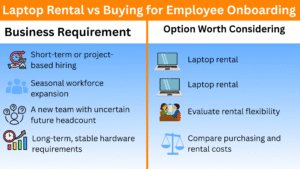
Laptop Rental vs Buying for Employee Onboarding
Should your company rent or purchase laptops for new employees? The right choice depends on how long the devices will be needed and how your business manages IT assets.