Hiring new employees is exciting for any business, but employee onboarding can become challenging when your IT team needs to arrange laptops, software, accessories, and technical support at short notice.
For companies hiring employees in bulk, opening a new office, managing remote teams, or handling temporary projects, purchasing a laptop for every new employee may not always be the most practical option.
This is where laptop rental for employee onboarding can help. With corporate laptop rental, businesses can arrange the required devices for new employees without making a large upfront investment in IT equipment. Companies can rent laptops according to their workforce Affordable Corporate Laptop Rental requirements and rental duration while keeping their IT infrastructure flexible.
In this guide, we will explain how laptop rental can simplify employee onboarding, its benefits, what specifications businesses should consider, and how to choose the right corporate laptop rental provider.
What Is Laptop Rental for Employee Onboarding?
Laptop rental for employee onboarding means renting laptops for newly hired employees instead of purchasing new devices for every employee.
This can be particularly useful when a company needs multiple laptops within a short period.
For example, imagine a company is onboarding 30 employees next month. Instead of purchasing 30 laptops immediately, the company can choose a bulk laptop rental service and arrange the required devices for the onboarding period.
This approach can help businesses:
- Reduce upfront hardware expenses
- Arrange laptops quickly for new employees
- Support bulk hiring requirements
- Handle temporary employees and projects
- Scale IT equipment according to workforce size
- Reduce the burden of laptop maintenance and replacement
For organizations with changing workforce requirements, Laptop Rental for Employee Onboarding can provide greater flexibility than purchasing devices for every short-term requirement.
Why Businesses Need Laptops During Employee Onboarding
Employee onboarding is more than completing HR paperwork.
A new employee often needs access to email, communication platforms, company applications, project management tools, CRM systems, cloud services, and other business applications from the first day.
Without a ready-to-use laptop, an employee may spend their first few days waiting for IT equipment.
This can affect productivity and create additional work for HR and IT teams.
A properly planned onboarding process ensures that the employee receives the necessary hardware and access before or on their joining date.
A properly planned onboarding process ensures that the employee receives the necessary hardware and access before or on their joining date.
7 Benefits of Laptop Rental for Employee Onboarding
1. Reduce Upfront IT Costs
Purchasing laptops for every new employee requires significant upfront investment.
For companies onboarding employees in large numbers, the cost can quickly increase.
With corporate laptop rental, businesses can avoid purchasing hardware for every temporary or project-based requirement.
The money saved from large hardware purchases can instead be used for recruitment, training, technology, or other business priorities.
2. Quickly Support Bulk Hiring
One of the biggest challenges for HR and IT teams is arranging laptops when many employees join at the same time.
For example:
Company hiring 5 employees:
5 laptops required.
Company hiring 25 employees:
25 laptops required.
Company hiring 100 employees:
100 laptops required.
A reliable bulk laptop rental service can help businesses arrange devices according to their onboarding requirements.
This makes laptop rental particularly useful for startups, IT companies, BPOs, MNCs, training organizations, and companies managing temporary projects.
3. Flexible Rental Periods
Some businesses hire:
- Temporary employees
- Contract employees
- Freelancers
- Project-based teams
- Interns
- Seasonal staff
- Event teams
- Training batches
Buying laptops for short-term requirements may not make financial sense. With Corporate laptop rental companies can select a rental duration based on their business requirement. This makes temporary laptop rental for employees a practical option for short-term workforce expansion.
4. Reduce IT Maintenance Responsibility
Laptop ownership also comes with responsibilities such as maintenance, repairs, upgrades, replacement, storage, and asset management.
When businesses rent laptops from a professional corporate rental provider, they may receive technical support and replacement services according to the rental agreement.
This allows internal IT teams to focus more on employee onboarding, cybersecurity, applications, and infrastructure instead of handling every hardware issue.
Important: The exact maintenance, replacement, insurance, and support terms depend on the rental provider and agreement. Businesses should confirm these details before placing an order.
5. Support Remote and Hybrid Employees
Remote and hybrid working models can make employee onboarding more complicated.
A new employee may work from a different city or even a different state.
Instead of purchasing and shipping laptops individually, companies can work with a laptop rental provider that offers delivery and support across multiple locations.
This can be especially useful for organizations onboarding employees across India.
6. Scale Your IT Infrastructure With Your Team
Business growth can happen quickly. A company may have 20 employees today and 50 employees after a few months. Buying large quantities of laptops in advance can leave businesses with unused equipment if hiring plans change. Rental provides a more flexible approach because the number of devices can be aligned with actual business requirements. For growing companies, this can make IT asset planning easier.
7. Provide Employees With Ready-to-Use Devices
A good onboarding experience starts before the employee’s first working day.
HR and IT teams can coordinate to ensure that laptops are available and configured according to company requirements.
Depending on the organization’s IT setup, devices can be enrolled into its device-management environment and configured with required applications and policies.
Microsoft’s current Windows device-preparation documentation describes workflows that can join devices to Microsoft Entra ID, enroll them into Intune, and install essential applications and scripts.
For businesses managing laptops for new employees, Microsoft Intune can simplify device enrollment and enterprise management. It helps IT teams configure devices, apply security policies, manage applications, and prepare laptops for employees efficiently. For more technical information, refer to Microsoft Learn’s guidance on Windows automatic enrollment and Intune.
Rental vs Buying :- Laptop Rental for Employee Onboarding
Businesses often ask whether they should buy or rent laptops for new employees.
The answer depends on factors such as employee tenure, budget, device lifecycle, IT policies, and expected workforce growth.
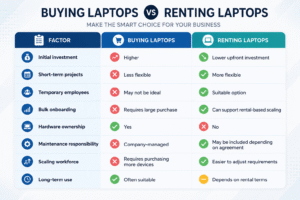
For companies that need laptops for several years and want to own their equipment, purchasing may make sense.
For companies dealing with temporary projects, rapid hiring, short-term requirements, or fluctuating workforce needs, laptop rental for employee onboarding can be a useful alternative.
What Laptop Specifications Should You Choose for laptop rental for employee onboarding?
The right laptop depends on the employee’s role.
A finance executive may have different requirements from a software developer or graphic designer.
Basic Office Work
Suitable for:
- HR teams
- Administrative employees
- Customer support
- Data entry
- Basic business applications
Business & Professional Work
Suitable for:
- Managers
- Sales teams
- Finance professionals
- Project managers
- Corporate employees
Technical & Advanced Work
Suitable for:
- Developers
- Engineers
- Data professionals
- Designers
- Video editors
The best configuration should always be selected according to the employee’s actual workload rather than simply choosing the most expensive laptop
How Employee Onboarding Works With Laptop Rental
A simple laptop rental onboarding process can look like this:
Step 1: Share Your Requirement
The company shares details such as:
- Number of employees
- Laptop specifications
- Rental duration
- Delivery locations
- Required software
- Joining dates
Step 2: Select the Laptops
The rental provider recommends suitable laptop models and configurations based on the requirement.
Step 3: Document Verification
Corporate laptop rental providers may request company and KYC-related documents before processing the order.
Step 4: Laptop Preparation
The laptops can be checked and prepared according to the agreed requirements.
Where applicable, the company’s IT team can handle organizational enrollment, security policies, applications, and user access.
Step 5: Delivery
The laptops are delivered to the required office or employee location according to the agreed delivery arrangement.
Step 6: Employee Onboarding
The employee receives the laptop and completes the company’s standard IT onboarding process.
Step 7: Support & Replacement
If included in the rental agreement, technical support and replacement services can help the business manage hardware-related issues during the rental period.
How SR IT Technology Can Help With Laptop Rental for Employee Onboarding Requirements
If your company is onboarding employees and needs multiple laptops, SR IT Technology provides corporate laptop rental solutions designed for business requirements.
The service can be useful for:
- Employee onboarding
- Bulk hiring
- Corporate projects
- Temporary employees
- Training programs
- Events
- Startups
- MNCs
- Remote teams
- Short-term IT requirements
SR IT Technology provides laptop rental services across India for eligible corporate and business requirements.
The available laptop configurations can include different brands and specifications such as Core i3, Core i5, and Core i7 processors, along with different RAM and SSD configurations.
For organizations requiring multiple devices, renting can provide an alternative to purchasing laptops for every temporary or changing requirement.
Why Choose Corporate Laptop Rental for New Employees?
The biggest advantage of Laptop rental for employees during employee onboarding is flexibility.
Instead of treating every laptop requirement as a permanent hardware purchase, businesses can match their IT equipment with their workforce requirements.
For example:
Hiring for a 3-month project?
Rent the required laptops for the project duration.
Opening a new branch?
Arrange laptops for the new team.
Onboarding 50 employees?
Arrange devices in bulk.
Running a training program?
Rent laptops for the training period.
This approach can help companies maintain a more adaptable IT infrastructure.
Laptop Rental for Startups and Growing Companies
Startups often need to manage cash flow carefully.
During the early stages of business growth, investing heavily in hardware may not always be the best use of available capital.
A startup may need laptops for:
- New hires
- Interns
- Developers
- Sales teams
- Remote employees
- Temporary projects
Instead of purchasing every device immediately, startups can consider laptop rental for employees as part of their IT procurement strategy.
This allows the company to focus its resources on growth while maintaining the hardware required for employees to work effectively.
Laptop Rental for HR and IT Teams
Employee onboarding is usually a joint responsibility between HR and IT.
HR manages the joining process, while IT ensures the employee has the required technology and access.
A Laptop Rental for Employee Onboarding can become part of this process by helping businesses arrange hardware according to upcoming hiring requirements.
For example, HR can share an onboarding forecast with the IT team:
10 employees joining → 10 laptops required
25 employees joining → 25 laptops required
50 employees joining → 50 laptops required
This simple planning process can reduce last-minute hardware requirements.
Best Practices for Laptop Rental for Employee Onboarding
Before Laptop rental for employees, businesses should create a clear checklist.
Hardware Checklist
- Confirm employee count
- Select appropriate specifications
- Confirm rental duration
- Check laptop condition
- Confirm accessories
- Verify serial numbers
Software Checklist
- Windows version
- Microsoft 365 requirements
- Antivirus/security software
- Business applications
- VPN
- Browser configuration
- Company applications
Security Checklist
- Employee authentication
- Device enrollment
- Password policies
- Endpoint security
- Data protection
- Access permissions
Microsoft’s Windows Autopilot and Intune documentation provides examples of how organizations can automate device enrollment, configuration, application installation, and device management.
Delivery Checklist
- Confirm employee joining dates
- Confirm delivery locations
- Coordinate with HR
- Coordinate with IT
- Maintain asset records
- Confirm receipt
Is laptop rental suitable for bulk employee onboarding?
Yes. Bulk laptop rental can be useful when a company needs multiple laptops for a large number of new employees, temporary teams, projects, or training batches.
Can I rent laptops for temporary employees?
Yes. Temporary and project-based employees can be one of the use cases for laptop rental, particularly when the hardware is required only for a limited period.
Can startups rent laptops for employees?
Yes. Startups can consider laptop rental when they need to equip new employees while keeping their upfront hardware investment flexible.
Can rented laptops be used for remote employees?
Depending on the rental provider's delivery and support coverage, laptops can be arranged for employees working from different locations.
What laptop configuration is best for office employees?
For standard office work, a laptop with an Intel Core i3 or i5-class processor, 8GB RAM, and an SSD can be sufficient for many users. Employees performing technical, creative, or resource-intensive tasks may need higher specifications.
Can laptops be configured with company software?
This depends on the rental provider and the company's IT process. Organizations can also use their own device-management tools to configure applications, policies, and security settings. Microsoft Intune and Windows Autopilot support several enterprise device provisioning and enrollment scenarios.
Is laptop rental better than buying?
It depends on the company's requirements. Buying can make sense for long-term ownership, while rental can be attractive for temporary projects, rapid hiring, changing workforce requirements, and situations where minimizing upfront hardware expenditure is important.
Conclusion: Make Laptop Rental for Employee Onboarding Is a Smart Choice
Employee onboarding should be about helping new employees become productive—not waiting for IT equipment to arrive.
For companies experiencing rapid hiring, temporary workforce expansion, remote onboarding, training programs, or project-based hiring, laptop rental for employee onboarding can provide a flexible way to arrange the required hardware.
Instead of purchasing laptops for every short-term requirement, businesses can consider Laptop Rental for Employee Onboarding according to their workforce and project needs.
If your company needs laptops for new employees, bulk hiring, corporate projects, training, or temporary requirements, explore a corporate laptop rental solution that matches your specifications, rental period, delivery requirements, and support expectations.
Need laptops for your next employee onboarding drive?
Contact SR IT Technology to discuss your corporate laptop rental requirement.